This is the story of the part of this website developed in Wagtail, the CMS software running on python-written web framework Django.
The process is well documented (the documentation for wagtail is great), but as the amateur I am, I did find some confusing bits that I would like to document here, for the benefit of people who might want to try as well.
Setting Up the Web App
The website is hosted by ecohosting, in a shared server that I manage with cPanel. These are the steps I followed to create the Python app that will run the wagtail site:
- Create the subdomain http://unthink.unthank.xyz
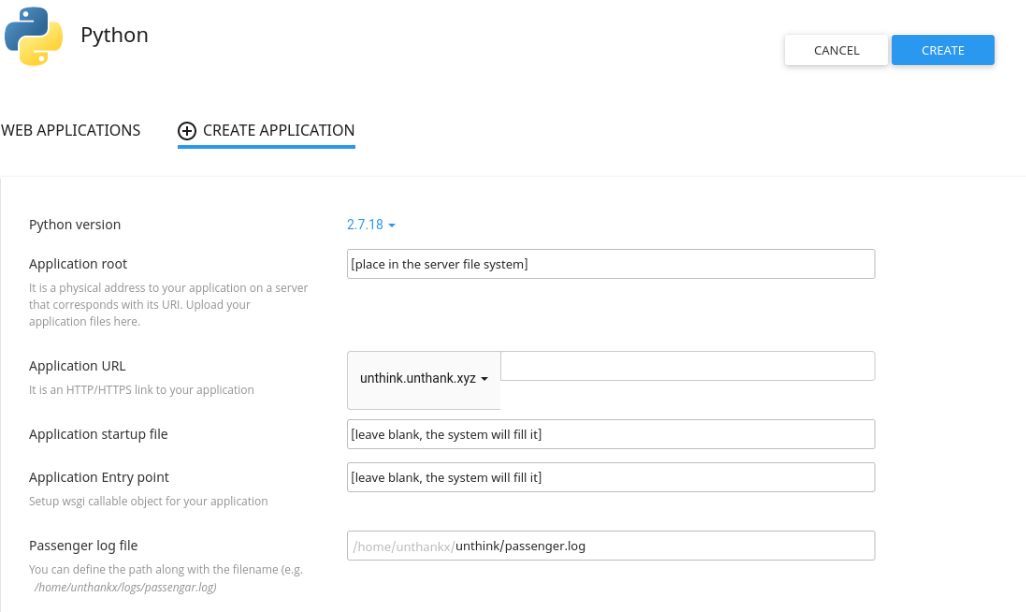
- Following the directions I found in EE in Tech I set up a python app associated with that domain from cPanel. This is what the form looks like:
- Directions can also be found in the documentation for hosting services. Kualo is very good for documentation like this.
- The server creates the folder where the application is going to be hosted, and a python virtual environment (this avoids version and dependencies clashes)
- From the terminal in cPanel (this can also be made from your terminal via ssh) I activated the virtual environment, which will be in [directory]/virtualenv . This is done with the command
$ source virtualenv/unthink/3.8/bin/activate- I chose python 3.8 for the installation, because that was the newest already installed in the server. You can install a newer locally (Geeksta gives you some directions to do it) but you would have to change some of the settings of the app started in cPanel, and I am not sure how.
- Within the new activated python environment, I moved to the newly created folder to start installing things:
(unthink:3.8)[unthankx@server ~] $ cd /home/user/name-of-folder (unthink:3.8)[unthankx@server ~]$ pip install --upgrade pip (unthink:3.8)[unthankx@server ~] $ cd /home/user/name-of-folder (unthink:3.8)[unthankx@server ~] $ pip install wagtail - Now this is a point where, after some trial and error, I deviated from the instructions given in EE in Tech, and followed those given in instead. The step suggested was installing the Wagtail project as:
This would leave the app in unthank/unthink and the website in unthank/unthink/unthink, creating problems with the folder structure (which is very important for Python) further down the road. The documentation for Wagtail explains that the folder unthink has been already generated by cPanel, and to use it for the new website it is necessary to add the folder again, as follows:(unthink:3.8)[unthankx@server ~] $ wagtail start unthink
(unthink:3.8)[unthankx@server ~] $ wagtail start unthink unthink - From here on, I follow Wagtail documentation:
(unthink:3.8)[unthankx@server ~] $ (unthink:3.8)[unthankx@server ~] $cd unthink (unthink:3.8)[unthankx/unthink@server ~] $ pip install -r requirements.txt (unthink:3.8)[unthankx/unthink@server ~] $ python manage.py migrate (unthink:3.8)[unthankx/unthink@server ~] $ python manage.py createsuperuser - At this point, it is necessary to restart the python app in the cPanel in order to be able to see the Wagtail welcome page.
- From here on, the elements of each part of the blog have to be set up. This is done by adding python code to the file Models.py in different places. For example for the home page, in unthink/home/models.py
from django.db import models from wagtail.core.models import Page from wagtail.core.fields import RichTextField from wagtail.admin.edit_handlers import FieldPanel class HomePage(Page): body = RichTextField(blank=True) content_panels = Page.content_panels + [ FieldPanel('body', classname="full"), ] - A template for the home page is also necessary, in unthink/home/templates/home/home_template.html:
{% extends "base.html" %}

{% load wagtailcore_tags %}

{% block body_class %}template-homepage{% endblock %}

{% block content %}
    {{ page.body|richtext }}
{% endblock %}